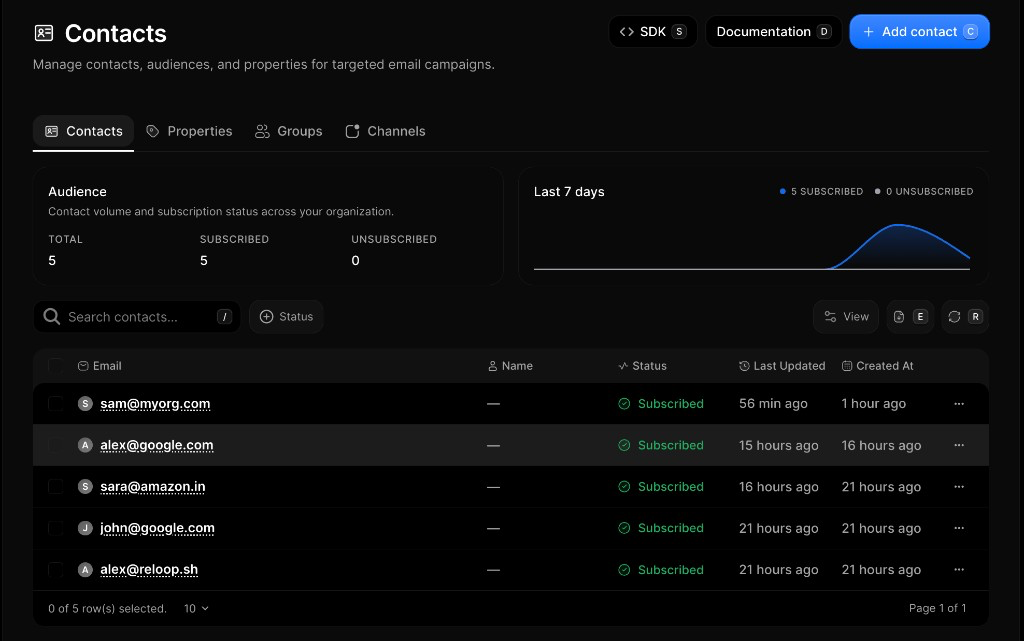
Contacts
Learn what Reloop contacts are and how to add, search, edit, unsubscribe, and delete contacts from the dashboard or API.
What is a Reloop contact?
A contact is one person in your organization, identified by a unique email (con_…). Subscription status, properties, groups, and channels stay on that record — so consent and traits stay consistent wherever you send.
Open the UI: Contacts

Why use contacts instead of raw email lists?
- One email → one identity (no duplicate profiles across campaigns)
- Status and suppression travel with the person, not a single send
- Attach traits, segments, and per-topic preferences without juggling spreadsheets
- Same record from the dashboard or with code
How do I add a contact?

- Go to Contacts
- Add Contact (or
⌘/Ctrl+A) - Enter one or more emails — optional groups
- Save
How do I find or search contacts?
Search by email, filter by status, export CSV. Click a row for detail — properties, groups, channels, and activity.

- Open Contacts
- Use Search by email or filter All / Subscribed / Unsubscribed
- Click a row to open detail — or Export CSV for an offline copy
How do I edit or unsubscribe a contact?
Change name, status, or properties — row menu or API.
| Action | What happens |
|---|---|
| Edit | Update name or properties |
| Subscribe / Unsubscribe | Toggle list status |
| View Details | Full profile, groups, channels, activity |
Status is subscribed, unsubscribed, or blocked (often from deliverability).

- Open Contacts
- Row ··· menu (or open the contact)
- Choose Edit, Subscribe, or Unsubscribe
How do I delete a contact?

- Open Contacts
- Row ··· → Delete
- Confirm
FAQ
Is each email its own contact?
Yes. A Reloop contact is one person record keyed by a unique email address in your organization. Subscription status, custom properties, groups, and channel preferences all live on that same record.
What happens if I add a duplicate email?
Email is unique per organization. Creating a contact with an email that already exists returns an error — update the existing contact instead of creating another one.
What is the difference between unsubscribed and blocked?
Unsubscribed means the contact opted out of your list. Blocked usually comes from deliverability issues such as a hard bounce or spam complaint, with a suppression reason on the contact.
Can I export my contacts?
Yes. From the contacts list in the dashboard, use Export CSV to download email, status, and created-at for the current view.
How do I manage contacts with code?
Use the Reloop SDK or REST API to create, list, get, update, and delete contacts — same operations as the dashboard. Jump to the API reference below.
Does Reloop sync contacts with external CRMs (Salesforce, HubSpot, etc.)?
No built-in two-way CRM sync. Use the Contacts API and webhooks to sync yourself, or connect Zapier / n8n between Reloop and your CRM.
Are there webhooks for contact events (created, updated, unsubscribed, deleted)?
Yes — contact.create, contact.update, contact.delete, contact.subscribed, contact.unsubscribed, and contact.blocked. See Contact webhooks and event types.
Is there a rate limit on the Contacts API?
Yes. Limits are per organization (e.g. create 200/min, list/get 60/min, update/delete 30/min). Over the limit → 429 with Retry-After. Full table: Usage Limits.
Is there a cap on total contacts per plan or organization?
No fixed total-contact cap per plan. You can store as many contacts as you need; bulk create/update is still gated by API rate limits.
Related
API reference
Was this page helpful?