Free Email HTML Editor
Edit email templates on a visual canvas. Tweak styles, add variables, and flip to the HTML source. Nothing leaves your browser.
Free to use. No account needed.
Why choose Reloop's
email HTML editor
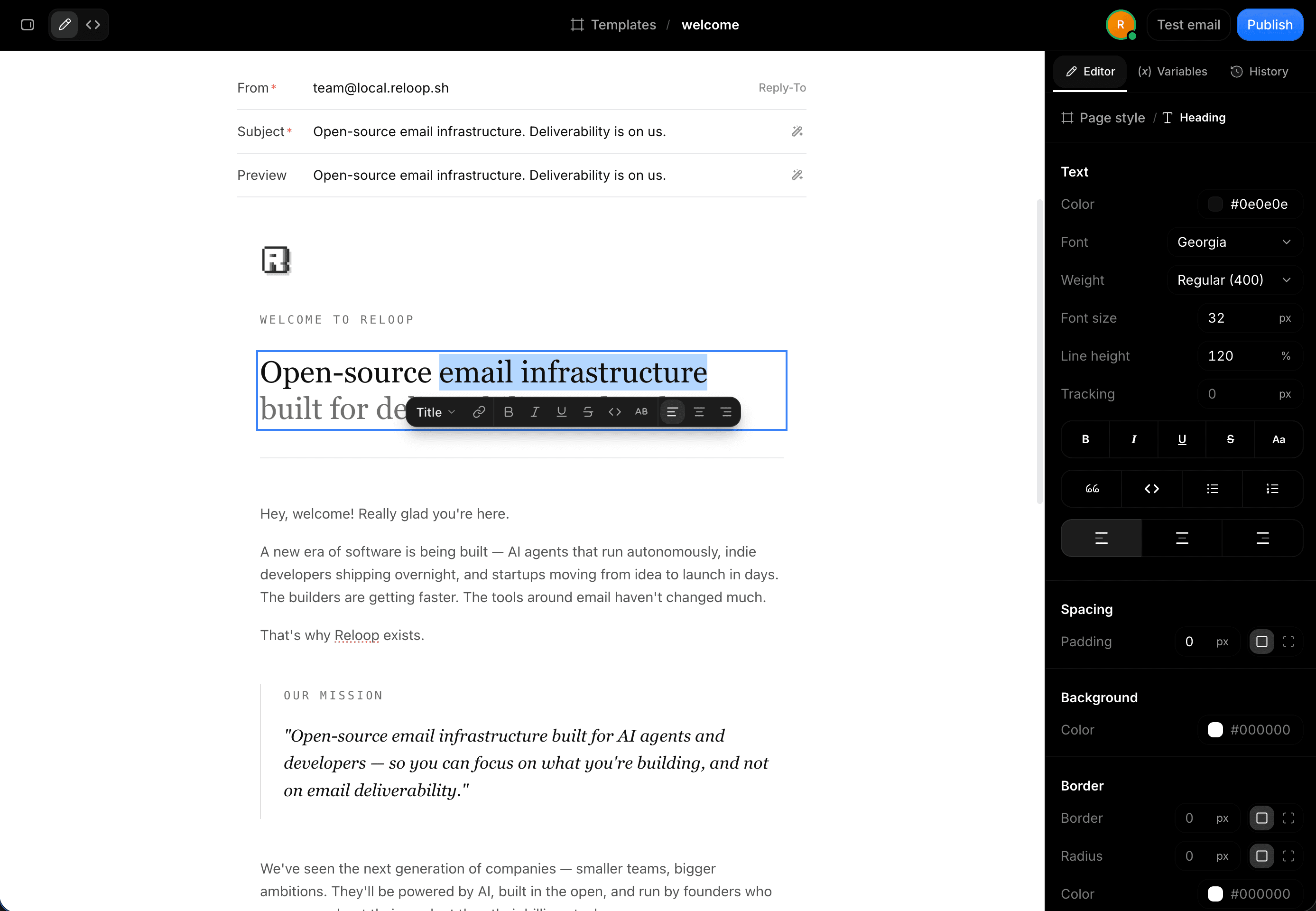
A visual canvas and the HTML source, kept in sync as you edit. Free to use in your browser, with nothing to install.
Start from a template
Open a ready-made email on the canvas. Columns, images, and buttons stay editable blocks, and you can paste your own HTML over it.
Inspect the same tree
Select a heading, cell, or button. Padding, color, and type edit the live document, then source updates to match.
Source stays in sync
Flip to code. Canvas typing and inspect writes compose back into the HTML. Edit source and the canvas updates.
No account to start
Edit freely in this tab. When you're happy, save it to Reloop Templates with a free account.
Start from a template,
make it your own
Pick a ready-made email and open it on the canvas. Every block stays editable, and you can paste your own HTML over it.
Pixel-perfect templates
for every transactional email
30 transactional emails from one design system, with the same type, spacing, and components. Open any of them and make it yours.
Where can I use Reloop's
email HTML editor?
Anyone who edits email HTML and wants to see the result while they work, from developers to support teams.
Developers
- Transactional email HTML
- Password reset and OTP emails
- Template variables
- Cleaning up pasted HTML
- Receipt and invoice layouts
- Quick copy fixes before deploy
- Source and canvas side by side
Designers
- Brand colors and type
- Spacing and padding tweaks
- Button and link styles
- Layouts without writing code
- Dark email themes
- Template variations
- Handoff-ready HTML
Product & Growth
- Onboarding emails
- Welcome sequences
- Feature announcements
- Trial ending reminders
- Waitlist confirmations
- Event invitations
- Newsletter drafts
Support & Operations
- Order and shipping updates
- Refund confirmations
- Security alerts
- Appointment reminders
- Account notices
- Billing and renewal emails
- Policy update emails
Explore all free email
& developer tools
More free utilities for checking deliverability, DNS records, and email authentication before you hit send.
Free Email Validator & List Cleaner
Verify syntax, disposable domains, and active MX records to keep your email list clean.
Email Deliverability & Spam Tester
Send a test email to analyze inbox placement, spam score, and SPF/DKIM alignment.
Email Spoofing & Phishing Checker
Test whether unauthorized senders can forge your domain to deliver phishing emails.
IP & Domain DNS Blocklist Checker
Check your sending IP address and domain against 50+ public DNS blocklists in real time.
DNS Lookup & Record Analyzer
Inspect MX, SPF, DKIM, DMARC, and A records with syntax validation and live diagnostics.
Domain Age Calculator
See exactly how old any domain is, with its registration date, expiry date and registrar.
Domain Warmup Checker
Check a domain's warmup stage and SPF, DMARC and MX readiness before you start sending.
Domain ESP & Email Sender Lookup
Identify all third-party email service providers authorized to send from your domain.
SPF, DKIM & DMARC Checker
Validate email authentication records to guarantee proper sender alignment and security.
Temp & Disposable Email Checker
Detect throwaway inboxes and burner addresses before they bounce or skew signup metrics.
Domain Reputation & Health Checker
Evaluate your domain health score, spam placement risk, and mail configuration flaws.
Lookalike Domain & Phishing Scanner
Detect registered typosquats and lookalike domains impersonating your brand online.
Email Spam Words & Subject Checker
Scan subject lines and body copy for spam trigger words that hurt inbox deliverability.
BIMI & Brand Avatar Checker
Verify your BIMI DNS record and SVG logo to display verified brand avatars in inboxes.
FAQ
Frequently asked questions.
No. There is no From, Subject, send, or test. Copy the HTML if you want to use it elsewhere.
The canvas, inspector, variables, and code view are the same as the Templates editor. Click Save template to keep it in your Reloop workspace, where you get history, publish, send, and collaboration.
Yes. After you tweak a block or type on the canvas, the code view shows the composed HTML. Editing source updates the canvas.
No. This tool runs entirely in the browser. Other Reloop tools that look up DNS or spam scores have public APIs; this one does not.
Ready to send your templates?
Let's talk.
Save templates to Reloop and send them with 3,000 free emails every month. Version history, variables, and deliverability built in.